
Summary
The whole project on one screen. Every feature and decision listed here links to its full write-up below.
- Role
- Solo — product, design, full stack
- Timeline
- 2026 — present
- Status
- Live in production
- Codebases
- 3 codebases (2 apps + 1 npm package)
- Frontend
- Next.js 15 · React 18 · TypeScript
- Backend
- NestJS 11 · Prisma 6
- Data
- PostgreSQL 17 · Prisma 6
- Tests
- 900+ automated tests across both apps, CI-gated
What I owned
- Product design and information architecture
- Frontend: App Router client, component system, all state and caching
- Backend: REST API, authorization, data model and migrations
- The shared contracts package and its release process
- CI, deployment and the local dev tooling
Where to look
- Accounts and sign-in: Email-and-password or Google sign-in, password reset by email, protected routes and clean logout across tabs.
- The routine builder: A multi-step wizard that turns a written programme into a schedule the app can execute against, then keeps it going with versions, training blocks, deloads and sharing.
- Live sessions and set logging: Start a session from a scheduled day and log reps, weight and RPE set by set, with each row saving as you go.
- The progression engine: Finishing a session rewrites the next one — the rule is configured per exercise, not applied globally.
- Strength trends and the plateau watch: Per-lift trends, a muscle-group heatmap, and a watch list that names the lifts that have stalled — without guessing why.
- The week, planned against logged: Planned routine days beside what was actually logged — and a day you did not train reads “not logged”, never “missed”.
Decisions, with their tradeoffs
Overview
Sunnsteel is a training platform for people who follow a written programme rather than improvising in the gym. You describe a routine once — which days you train, which exercises run on each day, how many sets, what rep range, how long to rest — and the app turns it into a schedule you execute set by set, measures what actually happened, and reminds you when the next session is due.
Around that core sits everything a programme needs to last a year rather than a month: saved versions, dated training blocks and deloads, strength trends and a plateau watch, ranks earned by showing up rather than by weight lifted, and a social layer where members follow each other, train as partners and share routines, with blocking, reporting and moderation underneath. It installs like a native app, works in English or Spanish, and has shipped more than 120 features across ten areas.
The part that makes it more than a logbook is progression. Each exercise carries a scheme that decides what happens after a session is finished: hold the load, add reps until the top of the range and then add weight, or advance each set independently. When you close a session the app applies that rule and rewrites the next one, so the programme moves forward without anyone editing a spreadsheet.
It is built as two deployable TypeScript applications — a Next.js client and a NestJS API — with a third package holding the types they exchange. That last piece is the load-bearing decision: it is what stops the two halves drifting apart, and it is described in full further down.
Architecture
Three codebases
- sunnsteel-frontend
- Next.js App Router client, rendered entirely client-side · TypeScript
- sunnsteel-backend
- NestJS REST API — auth, persistence, scheduled jobs, Web Push, metrics · TypeScript
- @sunsteel/contracts
- Published DTOs, enums and response types shared by both · TypeScript
One request, end to end
- A route component renders and calls a typed hook — it never fetches anything itself.
- The hook reads from TanStack Query; on a cache miss it delegates to a service function.
- The service issues the HTTP call, attaching the Supabase access token as a bearer credential.
- A NestJS guard verifies the token locally against Supabase’s published signing key, with no call to Supabase, and upserts the caller into the local users table.
- The controller validates the body against a DTO — unknown fields are rejected rather than ignored.
- The service runs the business logic and reads or writes through Prisma.
- A mapper converts the Prisma row into an @sunsteel/contracts type before serialisation.
- TanStack Query caches the typed response, and every component subscribed to that key re-renders.
Stack by layer
Frontend
An SPA on top of the App Router — every read goes through one caching layer.
- Next.js 15
- React 18
- TypeScript
- Tailwind CSS 4
- shadcn/ui
- Radix UI
- TanStack Query 5
- next-intl
- React Hook Form
- Zod
- Framer Motion
- date-fns
Backend
Modular NestJS: thirteen modules, from routines and workouts to schedule, activity, moderation and notifications.
- NestJS 11
- Passport
- passport-http-bearer
- class-validator
- class-transformer
- Throttler
- @nestjs/schedule
- web-push
- prom-client
Shared contracts
One published package, versioned independently of either app that consumes it.
- @sunsteel/contracts
- TypeScript
- Semantic versioning
Data & infrastructure
Postgres through Prisma, with migrations applied automatically on release.
- PostgreSQL 17
- Prisma 6
- Supabase Auth
- Vercel
- Railway
- prisma migrate deploy
Quality & delivery
Every push runs the same four gates that run locally.
- Vitest
- GitHub Actions
- ESLint
- Prettier
- npm audit
- PowerShell dev scripts
Feature deep-dives
F.01Auth
Accounts and sign-in
Email-and-password or Google sign-in, password reset by email, protected routes and clean logout across tabs.
Supabase is the identity provider, but it is not the authority the API trusts blindly. Supabase issues a JWT; a custom Passport strategy on the NestJS side verifies that token on every request, locally against the project’s published signing key so no request waits on Supabase, and upserts the caller into the local Postgres users table, so application data has a real foreign key to point at rather than a floating external id.
The frontend keeps an HttpOnly cookie as a session marker. Next.js middleware reads it to decide whether to render a protected route or bounce to sign-in. The cookie is deliberately not the credential — see the engineering note below.
F.02Routines
The routine builder
A multi-step wizard that turns a written programme into a schedule the app can execute against, then keeps it going with versions, training blocks, deloads and sharing.

Fig. 02The builder on its Build Days step, every training day filled in The wizard runs basic info, then training days, then a per-day exercise builder, then a review step before anything is written. Each exercise is configured with a set count, either a fixed rep target or a rep range, rest seconds, and free-text notes.
Exercises come from a catalogue tagged with primary and secondary movers plus equipment metadata, which is what lets the app attribute volume to muscle groups rather than just counting sets. Finished routines can be favourited, duplicated, edited or marked complete.
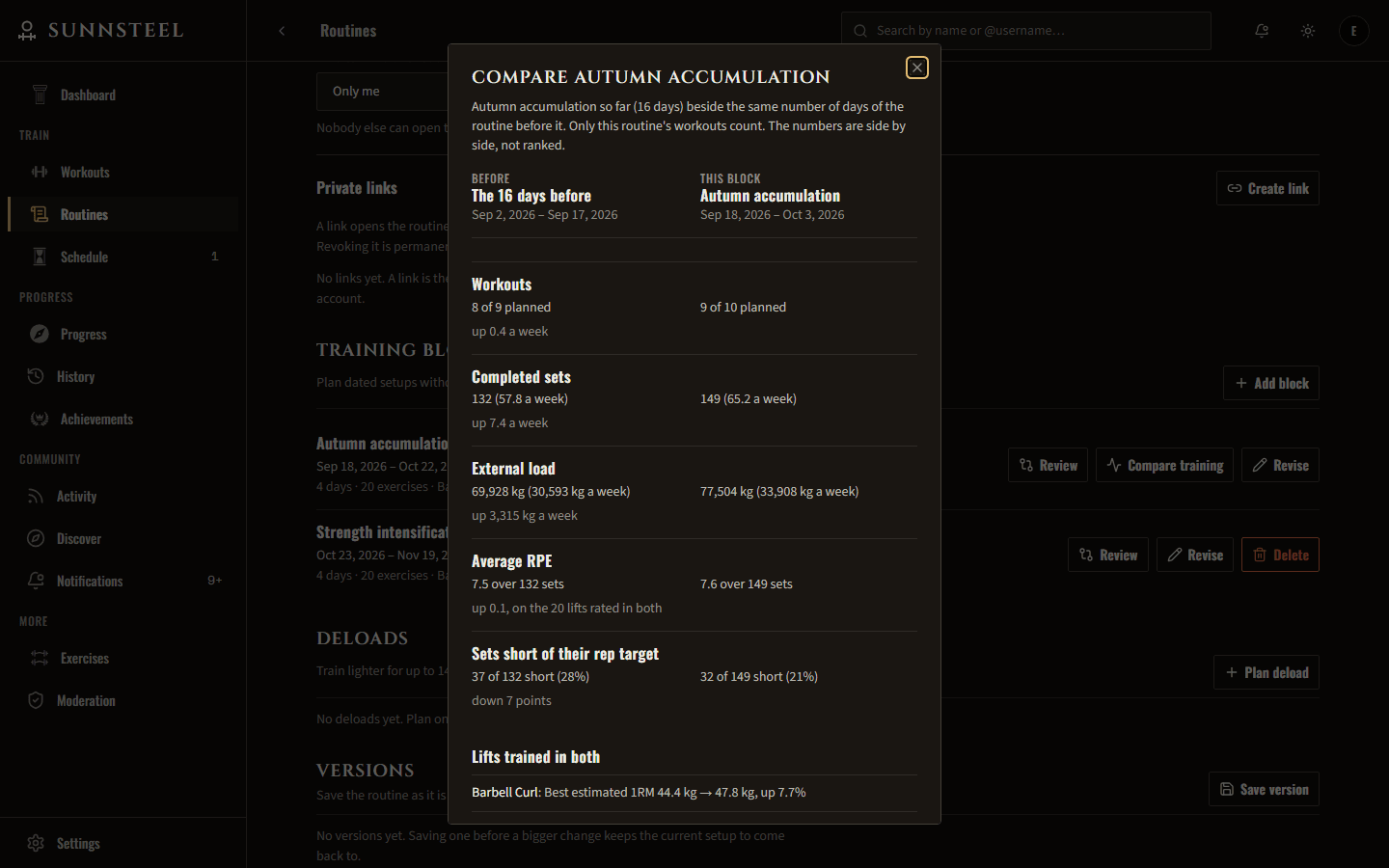
A routine is meant to outlive a training cycle. Saving a version captures it as it is, to compare with the current setup day by day and restore later. Dated training blocks plan named, non-overlapping phases from the routine or one of its versions, and while a block is in force the schedule, the dashboard and new workouts follow it. A deload plans up to two weeks of lighter loads, previewed exercise by exercise, without touching the routine or its blocks. Adjacent exercises link into supersets and circuits that keep their own sets and progress.
Routines also travel between members. Start from one of three curated templates; share a routine with followers, with everyone, or through a revocable private link, which carries the programme and never your workouts or notes; and clone anyone’s into a copy of your own that remembers whose it was. Shared routines can be browsed by goal, level, days a week, muscles trained and the equipment you actually have.
F.03Sessions
Live sessions and set logging
Start a session from a scheduled day and log reps, weight and RPE set by set, with each row saving as you go.

Fig. 03Logging sets live, each row saving on its own against its target Every set row carries its own save state — idle, pending, saving, saved or error — so a failed write is visible on the row that failed instead of behind a single global spinner. That matters in a gym on bad reception, which is the normal case rather than the edge case.
Sessions persist and can be resumed, and one abandoned mid-workout is offered back for recovery rather than silently ended; they track their own duration and accept notes. History is filterable, and a past session opens into a planned-versus-actual view so you can see where you deviated from the programme.
The session handles the parts of a real gym that a form would not. Warm-up ramps are built from the bar and plates you own and rise with the working weight as it progresses. Sets are marked as warm-up, working, drop or optional, and only working sets move a load forward. Supersets and circuits run in rounds, an exercise can be swapped mid-workout without touching the routine, and the screen stays awake. Rest alerts reach a locked phone through Web Push, naming the lift that is up next. Crossing a weight, rep, volume or estimated one-rep-max record is celebrated the moment it happens, and finishing opens a recap against the last session of the same day.
F.04Progression
The progression engine
Finishing a session rewrites the next one — the rule is configured per exercise, not applied globally.
Three schemes are available. None holds the prescription steady. Double progression adds reps until the top of the range is reached across all sets, then adds weight and drops back to the bottom of the range. Dynamic double progression applies that same logic to each set independently, so a set that stalled does not hold back the sets that did not.
The rule runs server-side on session completion, which keeps a single implementation of the maths and means the next session is already correct whenever and wherever it is opened. Finishing a workout then explains every change it made: which exercise, which rule, the reps performed against the target, and the old and new load.
F.05Progress
Strength trends and the plateau watch
Per-lift trends, a muscle-group heatmap, and a watch list that names the lifts that have stalled — without guessing why.
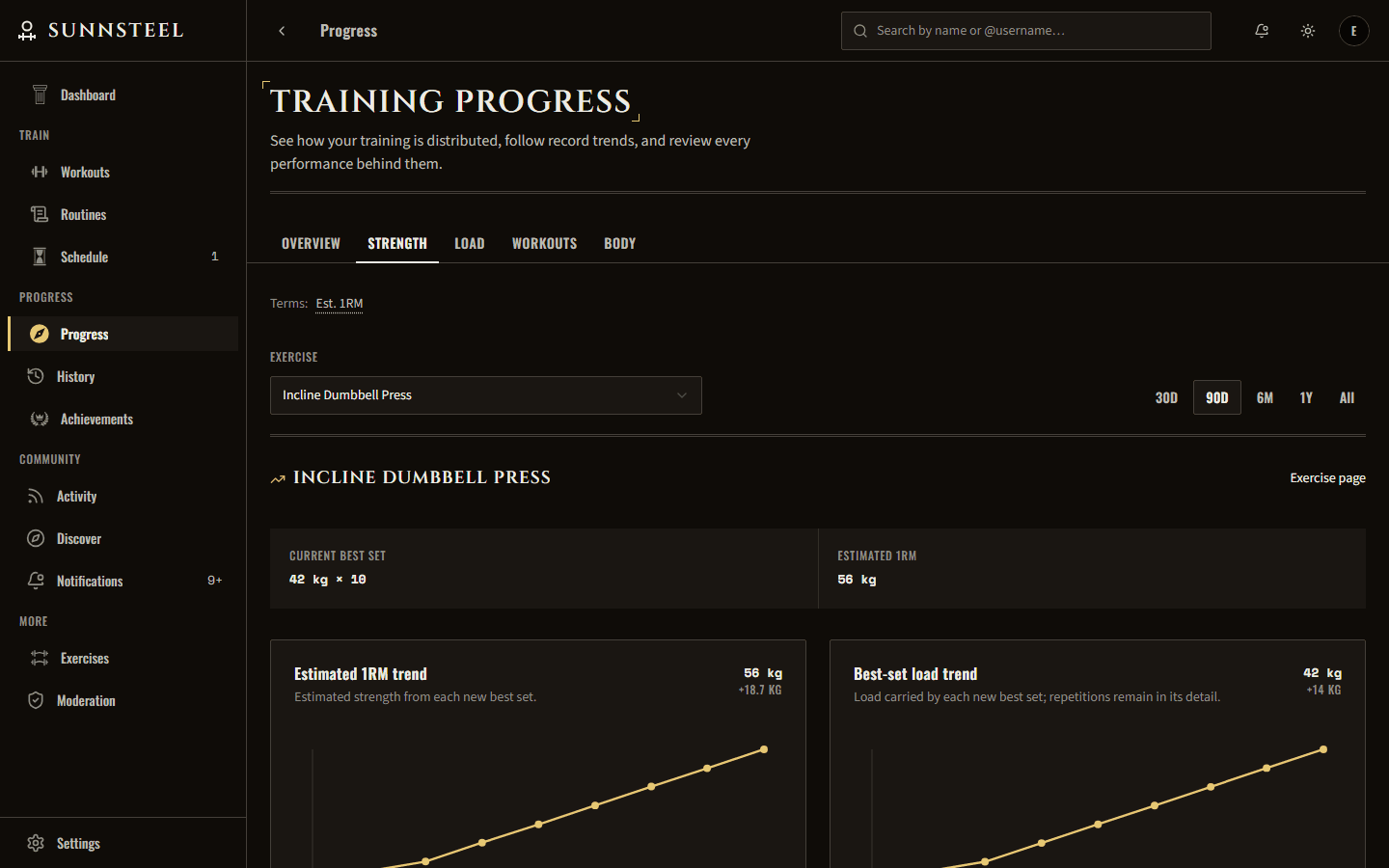
Fig. 04Strength trends — estimated one-rep max and best-set load over ninety days Pick a trained lift and the app charts its best-set load and estimated one-rep max over thirty days, ninety days, six months, a year or all time. Each range carries in the record that preceded it rather than starting the curve from whatever happens to fall inside the window, and the line is paired with the exact dated load-and-rep changes behind it. None of it uses a charting library: the trend chart is hand-written SVG.
The muscle-group heatmap compares four, eight or twelve weeks of training distribution, counting a completed set fully for the primary mover and half for each secondary one. That is what the catalogue metadata in the routine builder was for: volume gets attributed to muscles instead of being a count of sets. Weeks with no work show an honest zero, and the current partial week is marked as partial rather than quietly compared against completed ones. Beside them sit each exercise’s full performance history, volume trends, session-to-session comparisons, a timeline of records and load changes, private measurable goals, body measurements, a consistency calendar and training-block comparisons.
Plateau watch is the part I would show first. It lists lifts trained at least four sessions since their current best — a threshold you can move between three and eight, saved to your account — where that best is at least three weeks old. Each row gives the best set, its estimated one-rep max, and the closest you have come since. The rule is printed beside the list, and the feature never proposes a cause. It says what happened; the diagnosis is yours.
Training signals hold the same line. Four measures from the last two weeks sit beside the two before: average RPE, sets that fell short of their rep target, lifts whose estimated one-rep max fell twice running, and the number of workouts, each with its window and the threshold that marks it as changed. When they stay marked, Progress offers a short deload for the routine you train most, fills in the dates and lighter loads, and changes nothing until you save it.
F.06Schedule
The week, planned against logged
Planned routine days beside what was actually logged — and a day you did not train reads “not logged”, never “missed”.

Fig. 05A week of planned days beside what was logged, with today ready to start The schedule puts each week’s planned routine days next to the sessions that were completed, ended early, or are still in progress, and can switch to a whole month with one mark per day. A rotation that has chosen training weekdays lays its upcoming days out on those weekdays in order; a rotation without them says which day is next instead of inventing a date for it.
The wording is the design. A past planned day with no workout is marked “not logged”, and a planned rest day counts as rest rather than as a gap. An app that tells you that you failed on Tuesday is an app you stop opening in March.
Plans move, so the page lets them: a planned workout can be shifted up to six days without editing the routine — the original day records where it went, and the dashboard follows it — or skipped ahead of time, or skipped after the fact for a day within the last six, or postponed to the next free day in one tap. Every one of those is undoable.
The schedule also reaches you when the app is closed. Pick a time and it reminds you on planned days only, staying quiet on rest days and on days you have already trained; on the last day a streak can still be kept, it says so, with the dates rather than a lecture, in place of that day’s reminder.
Also in the app
Six features earn a deep dive above. The rest of what shipped, named rather than explained.
- Profiles and the social graph
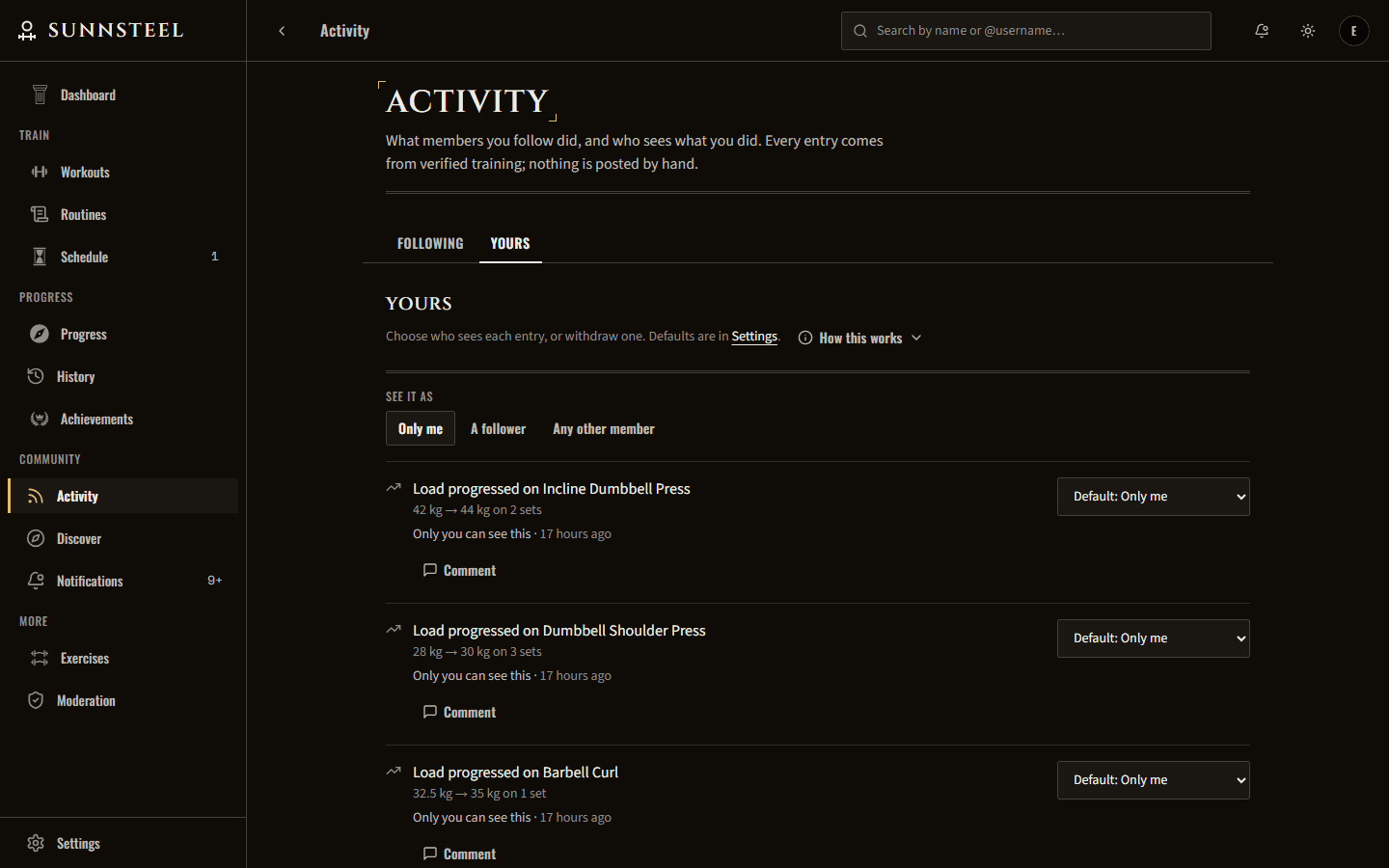
- A lowercase @username, a structured training identity and featured accomplishments; follow and unfollow, followers and mutual lists, training partners, and an activity feed with themed reactions, comments and encouragement; member search with per-account discovery controls; blocking, reporting and a moderation queue; and a public profile a signed-out visitor can open.
- Achievements
- Fixed milestones for completed sessions, logged sets and volume moved; Renaissance ranks earned through attendance rather than weight lifted, each with its own crest, leading the member’s profile and dressing its header more richly at every rank; progress toward the next milestone; and comeback recognition for returning after time away.
- The exercise catalogue
- Every exercise with its primary and secondary movers, movement pattern and equipment, filterable down to what one gym actually has, plus starred exercises and ones you add yourself, each with a page carrying your best set, estimated one-rep max and the records it earned.
- The dashboard
- Your current rank and exactly what the next one needs, one clear next action rather than a wall of buttons, this week at a glance, weekly and lifetime totals, current and best streaks, a personal-records wall, insights drawn from your own last two training weeks, and updates from the members you follow, in an order you choose.
- History and sharing
- Paginated, filterable history where any finished session opens into its full set-by-set log and notes, can still be corrected for a short while after it ends, and can be shared by link showing exactly the parts you choose — revocable whenever you like.
- Notifications
- A bell carrying an accessible unread count that opens the latest updates in a menu, a page listing what is actionable today, and alerts when a training partner finishes a workout or earns an achievement, each kind switchable on its own, with quiet hours.
- Settings and preferences
- English or Spanish; kilograms or pounds chosen once and respected everywhere; per-section profile privacy; registered gym equipment that feeds the plate calculator; reduced motion, higher contrast with larger controls, and a gym mode; light or dark themes; and your data downloadable, or your account deletable, at any time.
Engineering decisions
A published package as the API type boundary
- Problem
- Two separately deployed codebases exchange JSON. Nothing in TypeScript stops a field being renamed on one side and silently breaking the other at runtime.
- Decision
- The DTOs, enums and response types live in @sunsteel/contracts, published to npm and versioned independently. Both apps depend on it, so a shape change that has not been agreed on fails to compile rather than failing in production.
- Tradeoff
- Every contract change is now a publish-and-bump across two repos before it can be used. That is real friction on small changes, and it means a broken release can block both sides at once.
A mapper layer between Prisma and the wire
- Problem
- Returning Prisma results directly is the fastest way to build an endpoint and the fastest way to leak a column — internal ids, timestamps, soft-delete flags, anything added to the schema later.
- Decision
- Every response passes through a mapper that converts the database row into a contracts type. The API surface is defined by what the mapper produces, not by what the table happens to contain.
- Tradeoff
- Boilerplate per endpoint, and one more place to edit whenever a field is genuinely meant to be exposed. It is a tax paid on every route to make one class of accident impossible.
Two-tier auth: a cookie for routing, a JWT for authorization
- Problem
- Route protection wants something readable synchronously during a middleware pass. Authorization wants a credential the server verifies per request. Making one mechanism do both jobs means compromising one of them.
- Decision
- They are separated. An HttpOnly cookie acts purely as a UX gate so protected pages do not flash before redirecting. The Supabase JWT, verified on every API call, is the only thing that actually grants access to data.
- Tradeoff
- Two pieces of session state that can disagree — a valid cookie with an expired token renders the shell and then fails its first fetch. Handling that gap is deliberate work, and the failure mode is documented in the repo rather than discovered again later.
Verify tokens locally, not with a call per request
- Problem
- The API first asked Supabase Auth to validate every bearer token. That put a network round trip in front of every protected request and made every data read depend on Supabase Auth being up: over 22 and 23 September its logs showed 7,680 validation calls against 45 token refreshes.
- Decision
- The guard checks the token’s ES256 signature against the project’s published key set, cached in the process, then requires the right issuer, audience, role and subject itself. One protected read went from 274.9 ms to 8.3 ms at the median, measured locally with a real token.
- Tradeoff
- A token now outlives the session behind it until it expires, up to an hour, because nothing asks Supabase whether that session is still alive. Account deletion made the gap concrete, so a member the database does not know is still checked with Supabase, and only then.
Persisted analytics instead of lifetime scans
- Problem
- Records and progress were derived from a member’s entire set-log table on every read, so the cost of opening Progress grew with everything they had ever logged.
- Decision
- Personal records, immutable training events, daily and weekly muscle rollups and a routine snapshot per session are persisted, written atomically when a session finishes under a per-account lock, and rebuilt by a background backfill. Every Progress read is bounded: four to twelve weeks, capped event scans, cursors.
- Tradeoff
- Much more write-side machinery: projections, backfill jobs, snapshot provenance, SKIP LOCKED claiming, and a lock every writer must take in the same order. Correcting a finished workout has to rewrite its events and rollups exactly, which is why only the latest one can be corrected.
A generated service worker that keeps its own rules
- Problem
- The first PWA shipped a small hand-written worker, so revisioning and cache lifecycle were owned by hand. That produced stale assets hiding current code, unsafe activation, overly broad cache deletion, and a manual cache-version bump on every change.
- Decision
- Serwist builds the worker during the production build, with a precache manifest generated from that build’s own output. The policy stays explicit and tested: network-first pages with an offline fallback, stale-while-revalidate for static files, nothing cached for the API, and activation deferred until an active workout ends, so an update never interrupts a live session.
- Tradeoff
- The production build now depends on a webpack plugin while development runs on Turbopack and skips it, and a first install downloads the whole build, about 3.5 MB, rather than only what the visitor opens.
Screens

What’s next
- One search for the whole app: members, exercises, routines and your own workouts, with grouped suggestions as you type and your recent results kept on your account (NAV-01 to NAV-03).